- Press the PHONE button.
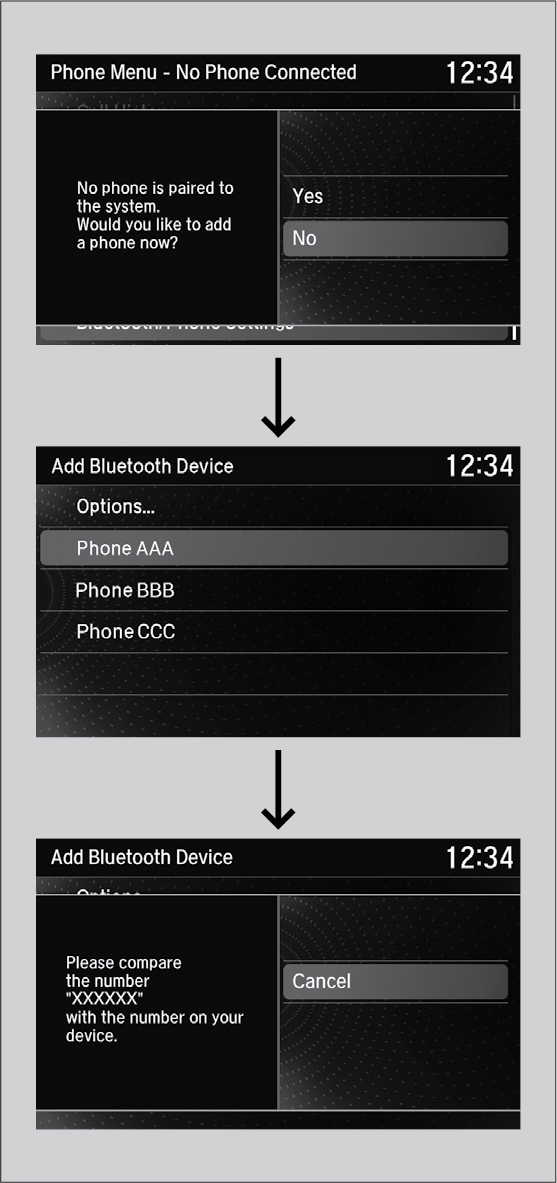
- Select Yes.
- Make sure your phone is search or discoverable mode, then press the interface dial.
HFL automatically searches for a Bluetooth® device.
- When your phone appears on the list, select it.
f your phone does not appear, you can select Options... and Refresh to search again.
If your phone still does not appear, select Options... to select Device Not Found? and search for Bluetooth® devices using your phone. From your phone, select HandsFreeLink.
- HFL gives you a pairing code on the information screen.
Confirm if the pairing code on the screen and your phone match.
This may vary by phone.
- A notification appears on the screen if pairing is successful.