When you connect an Android phone to the audio system via the USB port, Android Auto™ is automatically initiated. When connected via Android Auto™, you can use the information screen to access the Phone, Google Maps (Navigation), Google Play Music, and Google Now functions. When you first use Android Auto™, a tutorial will appear on the screen.
We recommend that you complete this tutorial while safely parked before using Android Auto™.
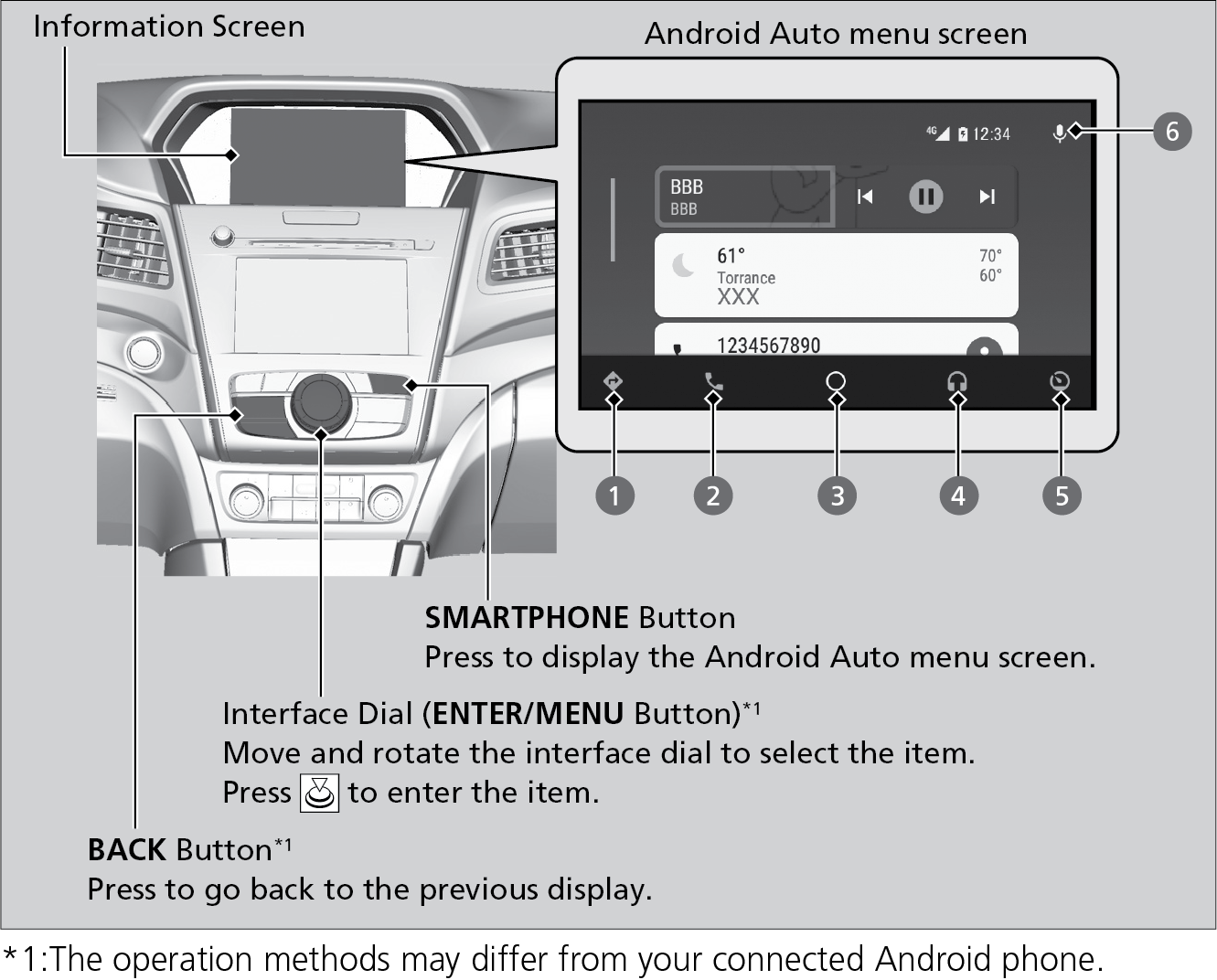
- Maps (Navigation): Display Google Maps and use the navigation function just as you would with your Android phone. When the vehicle is in motion, it is not possible to make keyboard entries. Stop the vehicle in a safe location to undertake a search or provide other inputs.
- Phone (Communication): Make and receive phone calls as well as listen to voicemail.
- Google Now (Home Screen): Display useful information organized by Android Auto into simple cards that appear just when they’re needed.
- Music and Audio: Play Google Play Music and music apps that are compatible with Android Auto. To switch between music apps, press this icon.
- Go back to the previous screen of this audio system.
- Voice: Operate Android Auto with your voice.