


Music Playback via USB Flash Drive
Your audio system reads and plays audio files on a USB flash drive.
Connect your USB flash drive to the USB port, then select the USB icon.
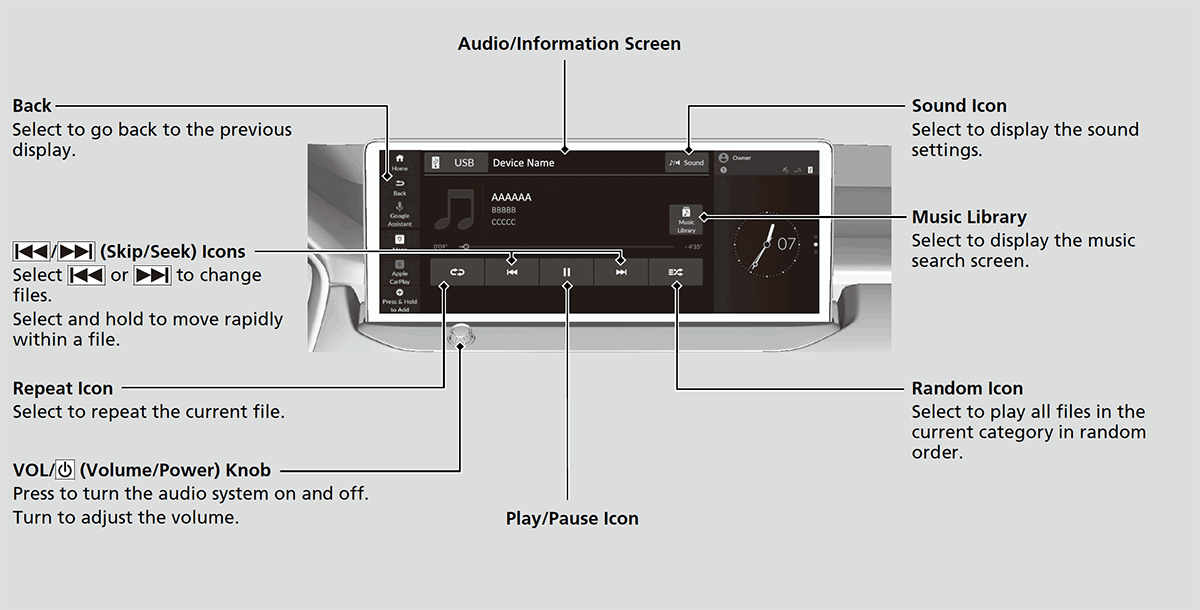
- Detail
-
Use the recommended USB flash drives.
Compatible iPod, iPhone, and USB Flash DrivesHonda App License AgreementLegal Information on Apple CarPlay/Android AutoAbout Open Source LicensesLicense Information
WMA files protected by digital rights management (DRM) cannot be played.
The audio system displays The selected file cannot be played on this system, then skips to the next file.
How to Select a File from the Music Search List
- Select Music Library.
- Select a search category (e.g., Artists, Albums, etc.).
- Continue making selections until you find the song of your choice.
How to Select a Play Mode
You can select random and repeat modes when playing a file.
Random/Repeat
Select random or repeat icon repeatedly until a desired mode.
Random
 Random off: Random mode turns off.
 Random all tracks: Plays all files in random order.
 Random in folder: Plays all files in the current folder in random order.
Repeat
 Repeat off: Repeat mode turns off.
 Repeat track: Repeats the current playing file. Repeat in folder: Repeats all files in the current folder.
- Recommended topic(s)
