
Audio Remote Controls
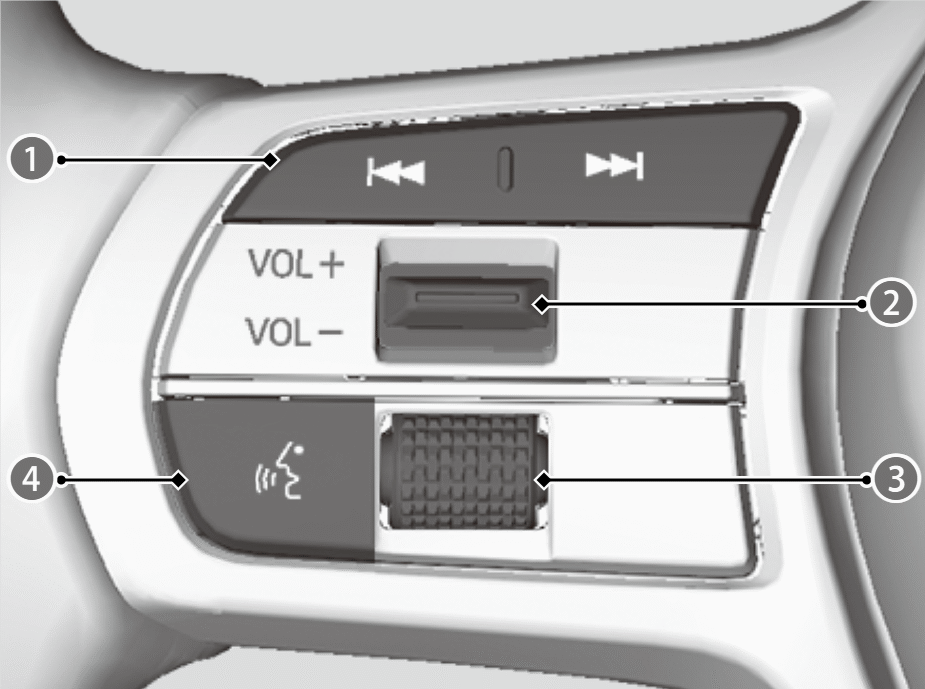

 /
/ (Seek/Skip) Buttons
VOL+/VOL- (Volume) Switch

Left Selector Wheel

 (Talk) Button
Allow you to operate the audio system while driving. The information is shown on the driver information interface.

Depending on the device you connect, some functions may not be available.
Seek/Skip Buttons
- When listening to the radio
Press: To select the next preset radio station.
Press: To select the previous preset radio station.
Press and hold: To select the next strong station.
Press and hold: To select the previous strong station. - When listening to a wired connection, USB flash drive, Bluetooth® Audio, or Smartphone Connection
Press: To skip to the next song.
Press: To go back to the beginning of the current or previous song. - When listening to a USB flash drive
Press and hold: To skip to the next folder.
Press and hold: To go back to the previous folder.
VOL+/VOL- (Volume) Switch
Press Up: To increase the volume.
Press Down: To decrease the volume.
Left Selector Wheel
To switch between audio modes, roll up or down and then press the left selector wheel.
- When cycling through the list, audio modes appear in the following order.Customize display ➔ Back ➔ Phone ➔ FM ➔ AM ➔ USB ➔ Bluetooth ➔ Apps (Apple Carplay/Android Auto) ➔ Alexa