
AT&T Hotspot
If you have subscribed to AT&T hotspot services, your vehicle will provide data to connect your mobile devices to the Internet. You can use the AT&T Hotspot app to turn vehicle data on/off and monitor data usage left on your subscription.
- To use AT&T Hotspot services, your vehicle must be subscribed to a data plan. If your vehicle is not subscribed to a data plan, you can add vehicle data services at:
U.S.: www.att.com/honda
Canada: https://myvehicle.att.com/#/honda/learn?country=CA&language=en (English)
https://myvehicle.att.com/#/honda/learn?country=CA&language=fr (French) - Alternatively, you can use your mobile hotspot to connect the vehicle and other mobile devices to the Internet.
AT&T Hotspot Menu
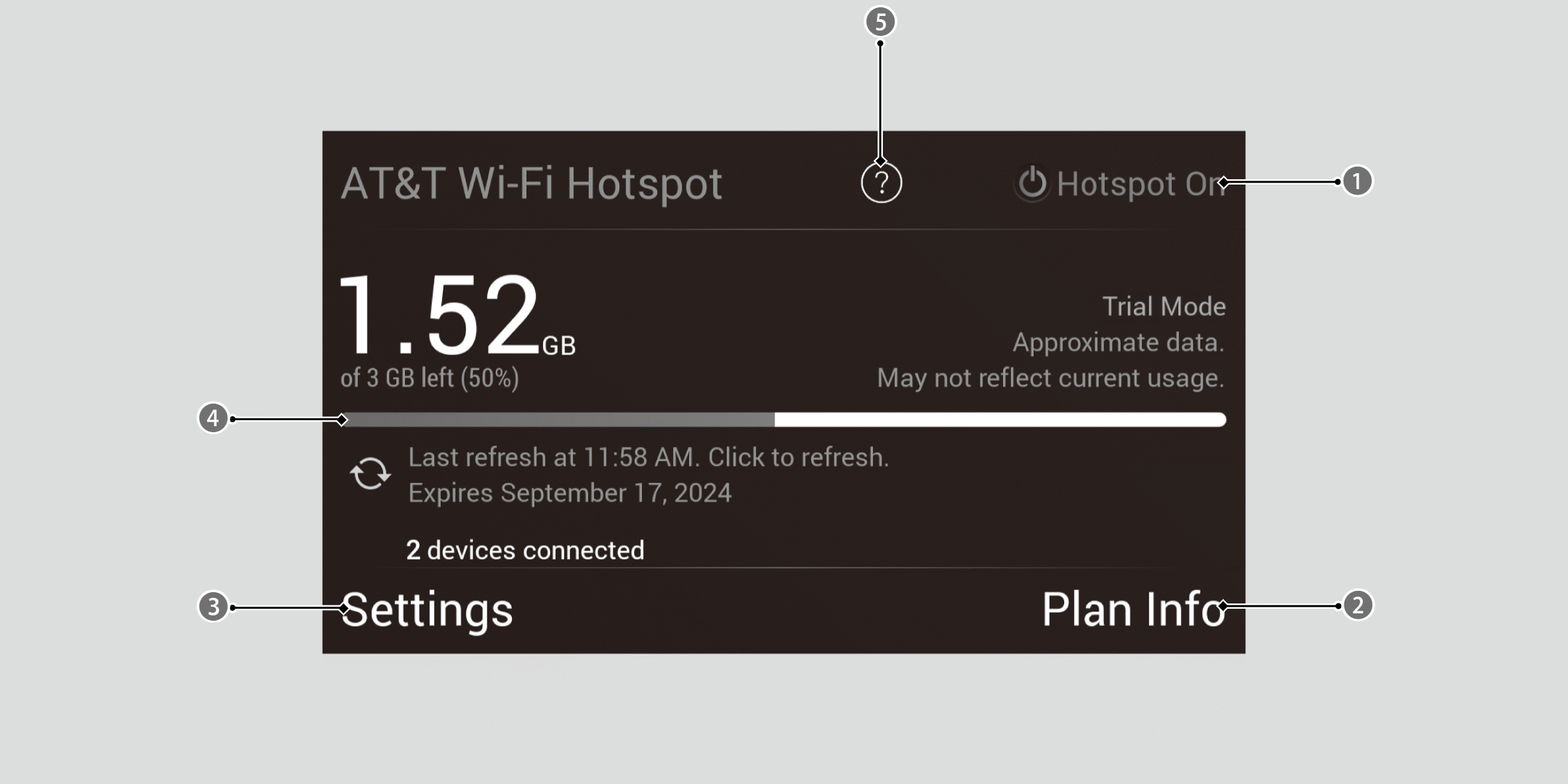

Hotspot Enable
Turn AT&T Hotspot on/off.

Plan Info
Shows your current AT&T subscription plan for the vehicle.

Settings
Shows the current username and password for vehicle Hotspot. Settings can be changed while the vehicle is not in motion.

Data Usage Bar
Check the current status of your data plan. This Usage Bar will show your current plan and how much data remains on your plan. Subscription plans for AT&T Hotspot can be added/modified at:
U.S.: www.att.com/honda

Help