
HomeLink® Universal Transceiver*1
The HomeLink® Universal Transceiver can be programed to operate up to three remote controlled devices around your home, such as garage doors, lighting, or home security systems.
Important safety precautions
Refer to the safety information that came with your garage door opener to test that the safety features are functioning properly.
If you do not have the safety information, contact the manufacturer.
Before programming HomeLink®, make sure that people and objects are out of the way of the garage or gate to prevent potential injury or damage.
When programming a garage door opener, park just outside the garage door’s path.
- Before programming HomeLink® to operate a garage door opener, confirm that the opener has an external entrapment protection system, such as an “electronic eye,” or other safety and reverse stop features. If it does not, HomeLink® may not be able to operate it.
HomeLink® will not operate when the vehicle security is set or about 30 minutes after the power mode is set to VEHICLE OFF. If HomeLink® indicator (LED) does not show when a button is pressed, ensure doors are unlocked or the power mode is set to ACCESSORY or ON to return HomeLink® to operation.

*1: Models with optional HomeLink®
Training HomeLink®
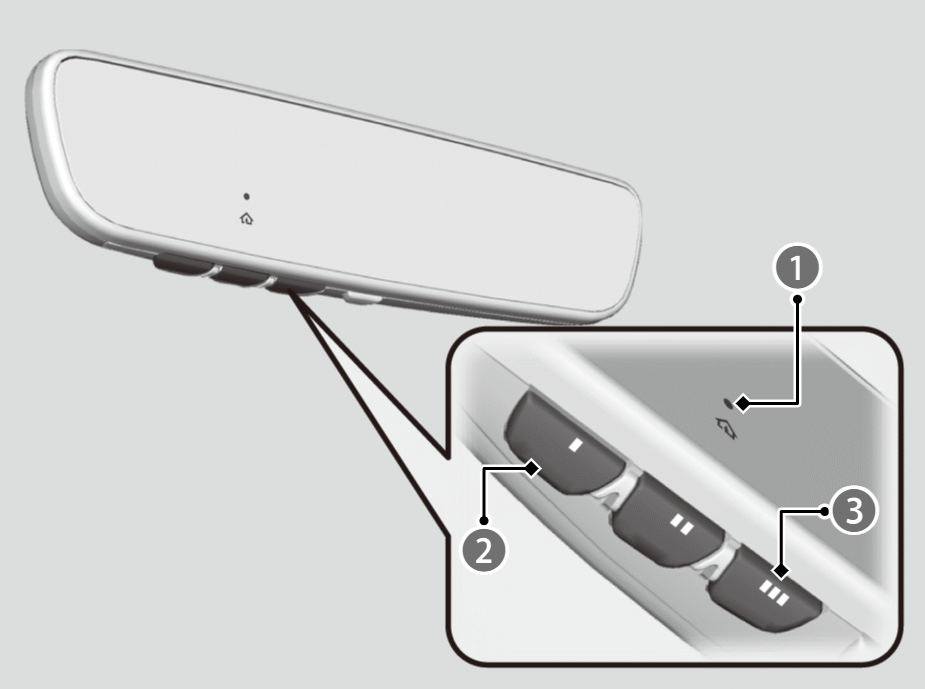

Indicator

I HomeLink® Button

III HomeLink® Button
If it is necessary to erase all previously entered learned codes:
- Press and hold the I and III HomeLink® buttons for about 10 seconds, until the green indicator blinks.
- Release the buttons to finish.
- If you wish to train a new learned code, go directly to the Programming a Button section.
Programming a button
These instructions should work for most gate or garage openers, but may not work for all. For detailed instructions about your specific remote opener, visit http://www.homelink.com or call (800) 355-3515.
[Preparation] Clear the area around the device (garage door). For best results, use fresh batteries in existing remote transmitter and park vehicle close to garage door. Review all steps before starting as some steps are time sensitive.
- Hold the remote transmitter you wish to link 1 to 2 inches (3 - 5 cm) from the HomeLink® button you want to program.
- Press the desired HomeLink® button. The HomeLink® indicator (LED) will slowly flash orange, if not see the Reprogramming a Button or Erasing Button Memory sections.
- While the HomeLink® indicator (LED) is slowly flashing orange, press and hold the button on the existing remote transmitter (Some garage doors may require you to press, hold and release the button on the remote every 2 secs). Within 60 seconds the HomeLink® indicator (LED) will change to rapidly flashing green or continuously on green.
- Press, hold for 2 seconds, and release the programed HomeLink® button 3 times.
Did the device (garage door opener) operate?
YES
Training Complete
NO
- Press and hold the HomeLink® button again, notice the HomeLink® indicator (LED).
HomeLink® indicator (LED) is continuously on green.
- Press and hold the HomeLink® button again. The device (garage door opener) should operate.
Training Complete
If the device does NOT operate, complete the Reprogramming a Button or Erasing Button Memory sections and then start at Step [1] again. If programming continues to fail, please visit http://www.homelink.com or call (800) 355-3515.
HomeLink® indicator (LED) rapidly flashes green.
- Your device (garage door opener) will need to synchronize with HomeLink®. Locate the learn button (may be labeled as program, smart, or similar) on the device’s main body (e.g. garage door opener motor). Only once you have located the button should you proceed to the next step, as it is time sensitive. Reference the device user manual for the exact location of the button if needed.
- Press the learn button on the device (garage door opener) and within 30 seconds return to your vehicle to press and release the programed HomeLink® button 3 times at 2 second intervals. The device (garage door opener) should operate.
Training Complete
If the device does NOT operate, complete the Reprogramming a Button or Erasing Button Memory sections and then start at Step [1] again. If programming continues to fail, please visit http://www.homelink.com or call (800) 355-3515.
Reprogramming a button
If you want to retrain a programed button for a new device, you do not have to erase all button memory. You can replace the existing memory code using this procedure:
- Press and hold the desired HomeLink® button until the HomeLink® indicator begins to slowly flash orange. This should take about 20 seconds.
- Release the HomeLink® button and position the remote transmitter you wish to link 1 - 3 inches (3 - 8 cm) from the HomeLink® button you want to program, then follow steps 3 - 6 under “programming a button.”
Erasing button memory
To erase programming from the buttons, press and hold the two outside HomeLink® buttons until the HomeLink® indicator changes from orange to rapidly flashing green. This should take about 10 seconds. You should erase all programming before selling the vehicle.
Operating
To operate, simply press and release the programed HomeLink® button. Activation will now occur for the trained device.
Questions
For questions or comments, visit https://www.HomeLink.com, https://www.youtube.com/HomeLinkGentex, or by calling the HomeLink® Hotline (North America only) at (800) 355-3515.
- HomeLink® is a registered trademark of Gentex Corporation.