


HondaLink®
HondaLink® connects you to the latest information from Honda. You can connect your phone wirelessly through Wi-Fi or Bluetooth®.
- Detail
-
The HondaLink® connect app is compatible with most iPhone and Android phones.Some cell phone carriers charge for tethering and smartphone data use. Check your phone's data subscription package.If there is an active connection to Apple CarPlay or Android Auto, HondaLink® can only be connected through Wi-Fi.
To Connect to HondaLink®
Use the following procedure to connect to HondaLink®.
To enable the HondaLink® service
- Press the
 button.
 - Select General Settings.
- Select System.
- Select Data Sharing Setting.
- Select ON.
To link with HondaLink®
-
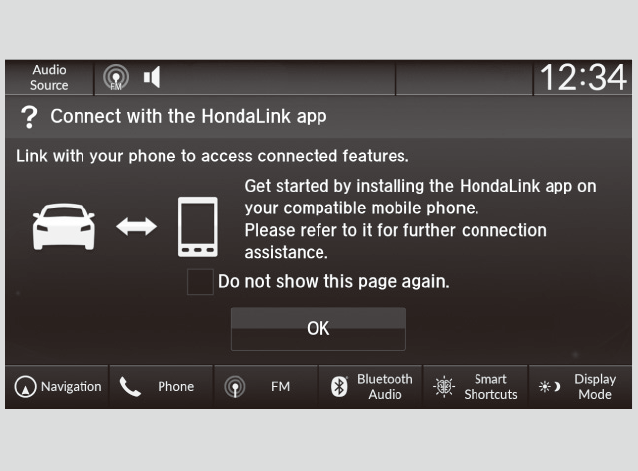
You can see the connection guide screen after launching HondaLink® when there is no connection to a network. If you do not need this guide, select check-box and select OK.
-
HondaLink® Menu
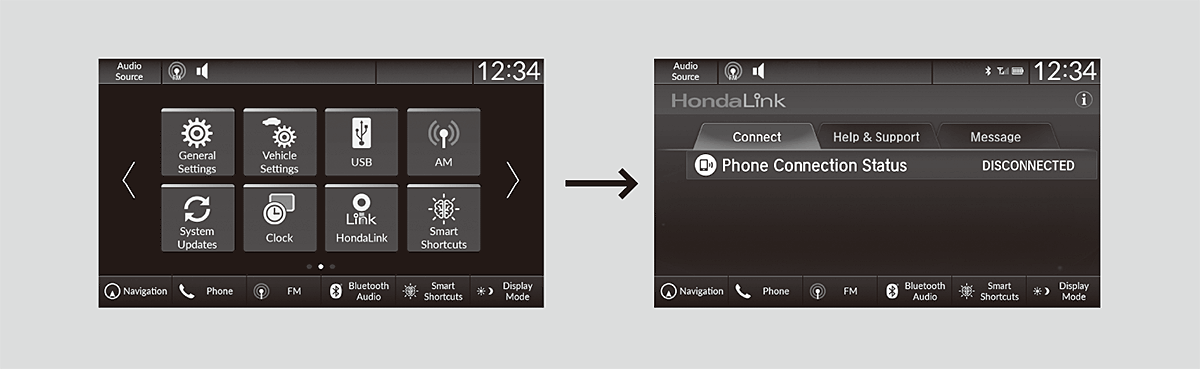
Connect
Displays the connection status of the vehicle.
Help & Support
Displays tips for vehicle usage, and get support via road side or customer service center.
Message
Displays helpful and important information from Honda.
Vehicle Information and Message from Honda Tips
You can check the messages that are received quickly in the shortcut operation.
- A notification appears and notifies you of a new message in the header area.
- Select the system status icon to see the messages.
- A notification icon is continuously displayed in the header area until the new message is read.
- Select a new message to open.
- Recommended topic(s)