


Deceleration Paddle Selector
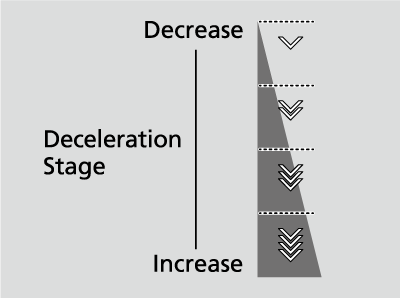
When you release the accelerator pedal, you can control the rate of deceleration without removing your hands from the steering wheel. Using the deceleration paddle selector situated on the steering wheel, you can sequentially shift through four stages of deceleration.
When descending a hill, you can use the deceleration paddle selector to help maintain the rate of deceleration, thereby allowing you to keep a safe distance between your vehicle and the vehicle ahead.
-
The default deceleration stage is
 . Each paddle selector operation makes a single stage deceleration change.
- The deceleration stage may not change if you keep the paddle selector pulled back.
-
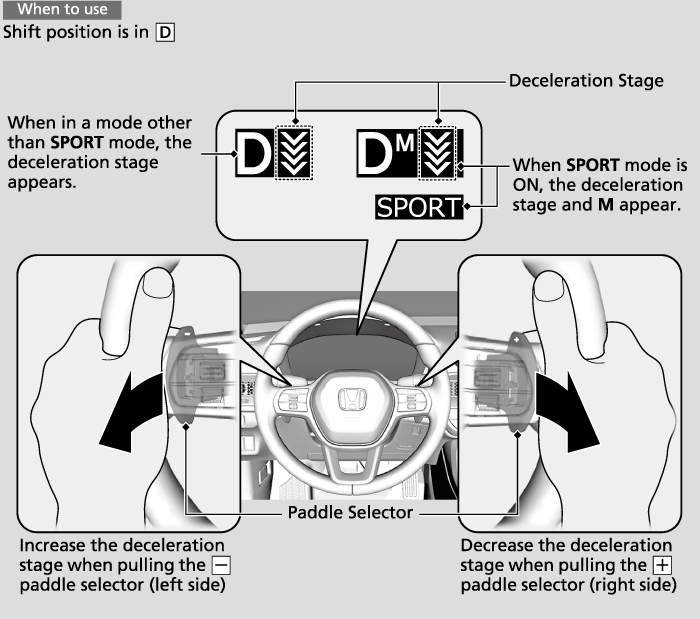
- Pull back the + selector (right side) to decrease the deceleration stage.
- Pull back the - selector (left side) to increase the deceleration stage.
Pull the + selector for a few seconds when you want to cancel the deceleration paddle selector.
- CAUTION
- Rapidly increasing the deceleration rate by quickly shifting the deceleration paddle selector can cause the tires to skid, resulting in a crash that could injure or kill someone.
Always maintain a reasonable rate of deceleration.
- Detail
-
If you pull back the right and left paddle selector at the same time, the deceleration stage may not change.In the following situations, the stage may not change and the stage icon will blink even if you pull back the selector. The deceleration stage may decrease or cancel automatically:
- The High Voltage battery is fully charged or its temperature is too cold or too hot.
- The speed of the vehicle is beyond the deceleration range.
- Hybrid system protection is needed.
- The paddle selector is operated while your vehicle is stopped automatically by ACC with Low Speed Follow.
- The brake pad temperature is too hot.
- Change the shift position to P, R, or N.
If either paddle selector is operated while driving, ACC with Low Speed Follow will cancel automatically.
When in a mode other than SPORT mode
If you pull back the paddle selector, the rate of deceleration will change temporarily, and the stage will appear in the gauge.
When you want to cancel the deceleration paddle selector, pull the + selector (right side) for a few seconds.
The deceleration paddle selector will cancel automatically and the deceleration stage in the gauge will disappear when you drive with constant speed or accelerate, or just before your vehicle stops.
When SPORT mode is ON
If you pull back the paddle selector, the rate of deceleration will change and the stage along with M will appear in the gauge. The deceleration stage is not canceled automatically while SPORT mode is ON.
When you want to cancel the deceleration paddle selector, turn the SPORT mode OFF or pull the + selector (right side) for a few seconds. When canceled, deceleration stage in the gauge disappears.
- Recommended topic(s)