


Audio Remote Controls
Models with 7-in. Color Touchscreen
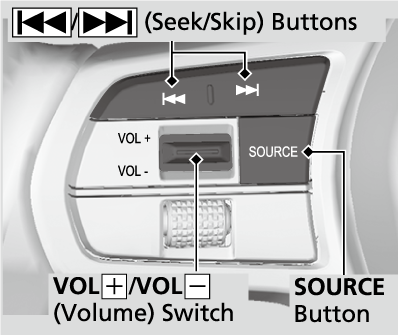
Allow you to operate the audio system while driving. The information is shown on the driver information interface.
-
- SOURCE Button
Cycles through the audio modes as follows:
FM→AM→USB/iPod/Apple CarPlay/Android Auto→Bluetooth - VOL+/VOL- (Volume) Switch
Press Up: To increase the volume.
Press Down: To decrease the volume.
- SOURCE Button
-
 /
/ (Seek/Skip) Buttons
- When listening to the radio
Press: To select the next preset radio station.
Press: To select the previous preset radio station.
Press and hold: To select the next strong station.
Press and hold: To select the previous strong station. - When listening to a wired connection, USB flash drive, Bluetooth® Audio, or Smartphone Connection
- Depending on a connected device, operations may be changed.
: To skip to the next song.
Press: To go back to the beginning of the current or previous song. - When listening to a USB flash drive or Bluetooth® Audio
Press and hold: To skip to the next folder/group.
Press and hold: To go back to the previous folder/group.
- When listening to the radio
Models with 9-in. Color Touchscreen
Allow you to operate the audio system while driving. The information is shown on the driver information interface.
-
- VOL+/VOL- (Volume) Switch
Press Up: To increase the volume.
Press Down: To decrease the volume.
- VOL+/VOL- (Volume) Switch
-
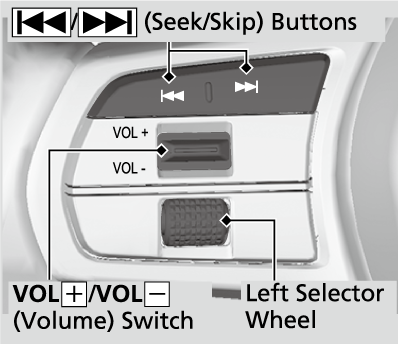
- / (Seek/Skip) Buttons
- When listening to the radio
Press: To select the next preset radio station.
Press: To select the previous preset radio station.
Press and hold: To select the next strong station.
Press and hold: To select the previous strong station. - When listening to a wired connection, USB flash drive, Bluetooth® Audio, or Smartphone Connection
- Depending on a connected device, operations may be changed.
: To skip to the next song.
Press: To go back to the beginning of the current or previous song. - When listening to a USB flash drive
Press and hold: To skip to the next folder.
Press and hold: To go back to the previous folder.
- When listening to the radio
- Left Selector Wheel
Roll up or down:
To cycle through the modes, roll up or down and then press the left selector wheel:
Back/Phone/FM/AM/USB/Bluetooth/Apple CarPlay/Android Auto/Alexa/Customize display- Depending on a connected device, the displayed modes may be changed.
- Detail
-
Some modes appear only when an appropriate device or medium is used.Depending on the Bluetooth® device you connect, some functions may not be available.
- Recommended topic(s)