


Music Playback via Wired Connection
Using your USB connector, connect the device to the USB port, then select the USB mode.
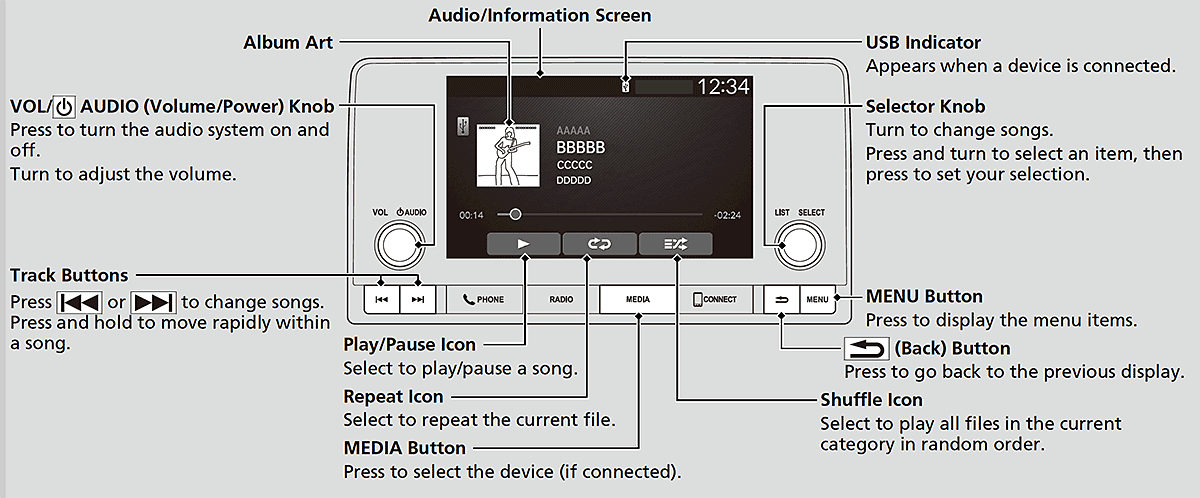
- Detail
-
Available operating functions vary on models or versions. Some functions may not be available on the vehicle's audio system.
How to Select a Song from the Device Music List
- Press
 to display the device music list.
 - Select a category.
- Select an item.
- Select an item repeatedly until a desired item you want to listen is displayed.
How to Select a Play Mode
You can select repeat and shuffle modes when playing a song.
Shuffle/Repeat
Select shuffle or repeat icon repeatedly until a desired mode.
 Shuffle off:
Shuffle mode to off.
Shuffle off:
Shuffle mode to off. Shuffle All Songs:
Plays all available songs in a selected list in random order.
Shuffle All Songs:
Plays all available songs in a selected list in random order. Repeat off:
Repeat mode to off.
Repeat off:
Repeat mode to off. Repeat all:
Repeats all songs.
Repeat all:
Repeats all songs. Repeat Song:
Repeats the current song.
Repeat Song:
Repeats the current song.- Recommended topic(s)