


Playing AM/FM Radio
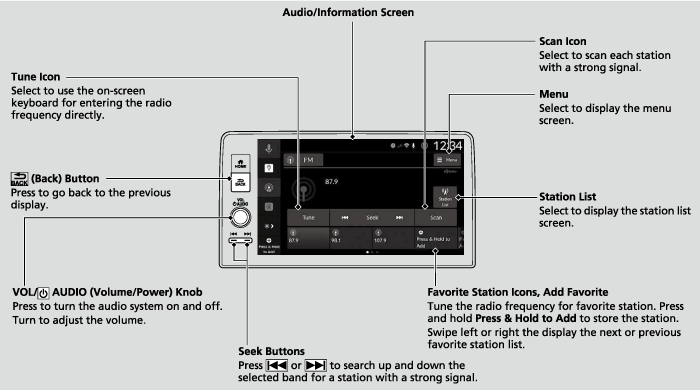
Favorite Station
To add a station:
- Tune to the selected station.
- Select and hold Press & Hold to Add.
- Detail
-
Switching the Audio ModeRoll the left selector wheel or select the audio source icon on the screen.
You can store 12 AM/FM stations into preset memory.
Editing a favorite station
Select and hold to desired favorite station icon.
The following items are available:
The following items are available:
- Remove Favorite: Delete the favorite station icon from the favorite station list.
- Replace with (number): Replace the stored favorite station icon.
- Add to Home: Add the shortcut icon of the stored favorite station to the home screen.
Station List
Lists the strongest stations on the selected band.
- Select Station List to display a list.
- Select the station.
Manual update
Updates your available station list at any time.
- Select Station List to display a list.
- Select Refresh.
Scan
Samples each of the strongest stations on the selected band for 10 seconds. To turn off scan, select Stop or press the  button.
Radio Data System (RDS)
Provides text data information related to your selected RDS-capable FM station.
- Detail
-
When you select an RDS-capable FM station, the RDS automatically turns on, and the frequency display changes to the station name. However, when the signals of that station become weak, the display changes from the station name to the frequency.
To find an RDS station from Station List
- Select Station List to display a list while listening to an FM station.
- Select the station.
Manual update
Updates your available station list at any time.
- Select Station List to display a list while listening to an FM station.
- Select Refresh.
HD Subchannel
Displays the subchannel list when an HD RadioTM station is selected while listening to an FM station.
- Select Station List.
- Select the channel number.
- Detail
-
HD RadioTM Technology manufactured under license from iBiquity Digital Corporation, a subsidiary of Xperi Inc., U.S. and Foreign Patents. For patents see https://xperi.com/hd-radio-patents/. Xperi, HD Radio, HD, and ‘ARC’ logos and their respective logos are trademarks or registered trademarks of Xperi Inc. and its subsidiaries in the United States and other countries.

AM/FM Settings
Changes the AM/FM settings.
- Select Menu.
- Select HD Radio.
- Select Auto or Analog Only.
- Recommended topic(s)