


Music Playback via Wired Connection
Using your USB connector, connect the device to the USB port, then select the USB icon.
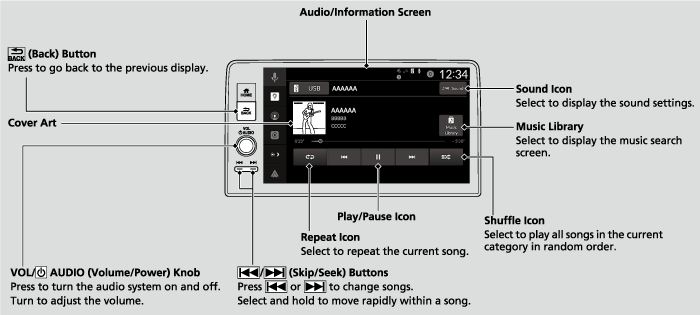
- Detail
-
Available operating functions vary on models or versions. Some functions may not be available on the vehicle’s audio system.If an iPhone is connected via Apple CarPlay, the USB source will be unavailable and audio files on the phone will be playable only within Apple CarPlay.
How to Select a Song from the Music Search List
- Select Music Library.
- Select a search category (e.g., Artists, Albums, etc.).
- Continue making selections until you find the song of your choice.
How to Select a Play Mode
You can select shuffle and repeat modes when playing a file.
Shuffle/Repeat
Repeatedly select the shuffle or repeat icon until you find a play mode option of your preference.
 Shuffle off: Shuffle mode turns off.
 Shuffle all songs: Plays all available songs in a selected list in random order.
 Repeat off: Repeat mode turns off.
 Repeat song: Repeats the current song.
 Repeat all: Repeats all songs.
- Recommended topic(s)