


Collision Mitigation Braking SystemTM (CMBSTM)
The CMBSTM is designed to alert you when the potential for a collision is determined, as well as assist in reducing speed, avoiding collisions, and reducing collision severity.
- Detail
-
Important Safety ReminderThe CMBSTM is designed to reduce the severity of an unavoidable collision. It does not prevent collisions nor stop the vehicle automatically. It is still your responsibility to operate the brake pedal and steering wheel appropriately according to the driving conditions.The CMBSTM may not activate or may not detect a vehicle in front of your vehicle under certain conditions:
You can read about handling information for the front wide view camera equipped with this system.
When the CMBSTM is activated, it will continue to operate even if the accelerator pedal is partially depressed. However, it will be canceled if the accelerator pedal is fully depressed.You cannot turn the CMBSTM off while driving.The CMBSTM may automatically shut off, and the safety support indicator (amber) will come and stay on under certain conditions:
The CMBSTM is not activated for about 15 seconds after the power system is turned on.The Vehicle Stability AssistTM (VSA®) system, Vehicle Stability AssistTM (VSA®) OFF*, Adaptive Cruise Control (ACC) with Low Speed Follow, low tire pressure/TPMS*, and safety support indicators may come on in amber along with a message in the gauge when you set the power mode to ON after reconnecting the 12-volt battery.
Drive a short distance at more than 12 mph (20 km/h).
Each indicator should go off. If any do not, have your vehicle checked by a dealer.
How the system works
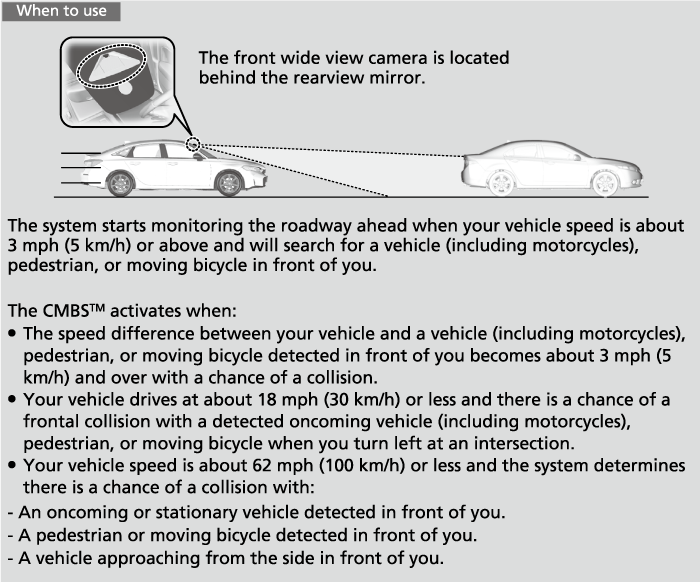
The CMBSTM will be canceled when your vehicle stops or the system determines there no longer is the potential for a collision.
The CMBSTM may also be canceled when a driver operates the steering wheel and the brake or accelerator pedal to avoid a collision.
- Detail
-
The camera in the CMBSTM is also designed to detect pedestrians.
However, this pedestrian detection feature may not activate or may not detect a pedestrian in front of your vehicle under certain conditions.
Refer to the ones indicating the pedestrian detection limitations from the list.
When the system activates
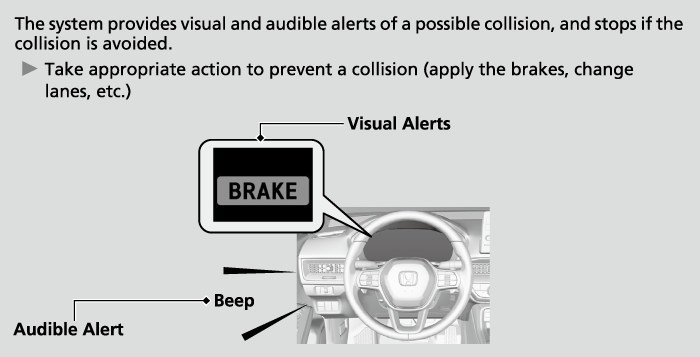
You can change the distance (Long/Normal/Short) between vehicles at which the system’s earliest collision alert will come on.
Customized FeaturesDefaulting All the Settings
When in Long, visual and audible alerts come on at a longer distance from a vehicle ahead than in Normal setting, and in Short, at a shorter distance than in Normal.
Collision Alert Stages
The system has three alert stages for a possible collision. However, depending on circumstances, the CMBSTM may not go through all of the stages before initiating the last stage.
|
Distance between vehicles
|
CMBSTM
|
|||
|---|---|---|---|---|
|
The sensors detect a vehicle
|
Audible & Visual WARNINGS
|
Braking
|
||
|
Stage one
|
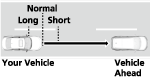 |
There is a risk of a collision with the vehicle ahead of you.
|
The visual alert flashes.
If the distance between your vehicle and the vehicle in front of you continues to decrease, the audible alert sounds in addition to the visual alert flashing.
|
—
|
|
Stage two
|
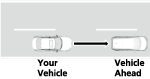 |
The risk of a collision has increased, time to respond is reduced.
|
Visual and audible alerts.
|
Lightly applied
|
|
Stage three
|
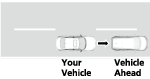 |
The CMBSTM determines that a collision is unavoidable.
|
Forcefully applied
|
|
CMBSTM On and Off
You can turn the system on and off using the driver information interface.
Switching the Display (A-type Meter) Switching the Display (B-type Meter)
Safety Support (A-type Meter) Safety Support (B-type Meter)
The CMBSTM is turned on every time you turn the power system on, even if you turned it off the last time you drove the vehicle.
CMBSTM Conditions and Limitations
In the following situations, the front wide view camera may be unable to correctly detect vehicles, pedestrians, moving bicycles, or road conditions, potentially causing the CMBS to operate improperly.
- Detail
-
Have your vehicle checked by a dealer if you find any unusual behavior of the system (e.g., the warning message appears too frequently).
Environmental conditions
- Driving in bad weather (rain, fog, snow, etc.).
- Sudden changes between light and dark, such as the entrance or exit of a tunnel or the shadows of trees, buildings, etc.
- There is little contrast between objects and the background.
- Driving into low sunlight (e.g., at dawn or dusk).
- Strong light is reflected onto vehicles (including motorcycles), pedestrians, moving bicycles, or road surfaces.
- Roadway objects or structures are misinterpreted as vehicles and pedestrians.
- Water is sprayed by or snow blown from a vehicle ahead.
- Driving at night or in a dark place such as a tunnel (due to low-light conditions, vehicles [including motorcycles], pedestrians, or moving bicycles may not be illuminated).
Roadway conditions
- Driving on a snowy or wet roadway (obscured lane marking, vehicle tracks, reflected lights, road spray, high contrast).
- Driving on curvy, winding, or undulating roads.
- The road is hilly or the vehicle is approaching the crest of a hill.
- Your vehicle is strongly shaken on uneven road surfaces.
Vehicle conditions
- Tire chains are installed.
- Driving at night or in a dark place (e.g., a tunnel) with the headlights off.
- The front wide view camera is covered by dirt, fog, rain, mud, wet snow, accessories, stickers, film, etc. on the windshield.
- The inside of the windshield is fogged.
- There is residue on the windshield from the windshield wipers.
- When lighting is weak due to dirt covering the headlight lenses, or there is poor visibility in a dark place due to the headlights being improperly adjusted.
- An abnormal tire or wheel condition (incorrect sizes, varied sizes or construction, improperly inflated, etc.).
- The vehicle is tilted due to heavy load in the trunk or rear seats.
- The suspension has been modified.
- Driving with the parking brake applied.
- Camera vision is blocked by drops of water from the window washer, or by the wiper blades.
- Operation of the vehicle is unstable due to a slippery road, etc.
Examples of limitations on the correct detection of the front wide view camera due to the condition of the vehicle ahead of you, oncoming vehicles, vehicle approaching from the side, pedestrians, or moving bicycles
- The distance between your vehicle and the vehicle (including motorcycles) ahead of you, oncoming vehicle, vehicle approaching from the side, pedestrian, or moving bicycle ahead of you is too short.
- The vehicle (including motorcycles) ahead of you, oncoming vehicle, vehicle approaching from the side, pedestrian, or moving bicycle suddenly cuts in front of or jumps out in front of you.
- The bicycle is stopped.
- The oncoming vehicle or vehicle (including motorcycles) ahead of you is sideways or facing diagonally.
- When the vehicle (including motorcycles) ahead of you, oncoming vehicle, vehicle approaching from the side, pedestrian, or moving bicycle blends in with the background, preventing the system from recognizing them.
- When several pedestrians are moving ahead of you in a group.
- When several bicycles are moving ahead of you in a group.
- When a pedestrian or moving bicycle crosses the road too quickly.
- A pedestrian or moving bicycle approaches from the opposite direction.
- The headlights of the vehicle ahead of you or oncoming vehicle are lit on one side or not lit on either side in a dark place.
- When part of a pedestrian (heads, limbs, etc.) is hidden by a carried object.
- When a pedestrian is bent over or squatting, when their hands are raised, or they are running.
- When the pedestrian is shorter than about 3.3 feet (1 meter) or taller than about 6.6 feet (2 meters) in height.
- When the pedestrian is pushing a stroller or bicycle.
- A vehicle is approaching diagonally from the side.
- A specially-shaped vehicle (such as a tank lorry or a lorry without a luggage) is approaching from the side.
- A vehicle approaching from the side is driving on a curve or hill.
Examples of other limitations on detection or system operation
- When the vehicle (including motorcycles) ahead of you is a small motorcycle, motorcycle with a sidecar, wheelchair, or other specially shaped vehicle.
- When a vehicle is lower in the rear than the front such as trucks that are not carrying a load, or a narrow vehicle.
- When the vehicle (including motorcycles) ahead of you, oncoming vehicle, pedestrian, or moving bicycle is not in front of the vehicle.
- The speed difference between your vehicle and the vehicle (including motorcycles) ahead of you, oncoming vehicle, pedestrian, or moving bicycle is significantly large.
- The speed difference between your vehicle and a vehicle, pedestrian, or moving bicycle approaching from the side is significantly large.
- When the vehicle (including motorcycles) or moving bicycle in front of you slows suddenly.
- When the driver operates the brake pedal and steering wheel to avoid a collision.
- When you approach the vehicle (including motorcycles) ahead of you, oncoming vehicle, pedestrians, or moving bicycles while accelerating rapidly or operating the steering wheel (except when turning left at an intersection etc.)*1
- When the moving bicycle is a child-sized bicycle, folding bicycle, three-wheeler or other bicycle with small tires, or a long bicycle like a tandem bicycle.
- When the front wide view camera cannot correctly identify the shape of the vehicle (including motorcycles) ahead of you, oncoming vehicle, vehicle approaching from the side, pedestrian, or moving bicycle.
- When a vehicle (including motorcycles) that has an extremely high minimum ground clearance is ahead of you or approaching from the side.
- When there is a possibility of a frontal collision with the oncoming vehicle while turning left, the CMBSTM is activated. However, it may not be activated if you suddenly turn the steering wheel.
Automatic shutoff
The CMBSTM may automatically shut itself off and the safety support indicator (amber) comes and stays on when:
- You drive off-road or on a mountain road, or curved and winding road for an extended period.
- Driving in bad weather (rain, fog, snow, etc.).
- Driving with the parking brake applied.
- The front wide view camera temperature gets too high.
- The front wide view camera is covered by dirt, fog, rain, mud, wet snow, accessories, stickers, film, etc. on the windshield.
- An abnormal tire condition is detected (incorrect tire size, flat tire, etc.).
Once the conditions that caused the CMBSTM to shut off improve or are addressed (e.g., cleaning), the system comes back on.
With Little Chance of a Collision
Also, the system may activate if it detects a possibility of collision with pedestrians, moving bicycles, or vehicles.
- Your vehicle approaches or passes another vehicle that is making a left or right turn.
- Your vehicle approaches another vehicle ahead of you and you change lanes to pass.
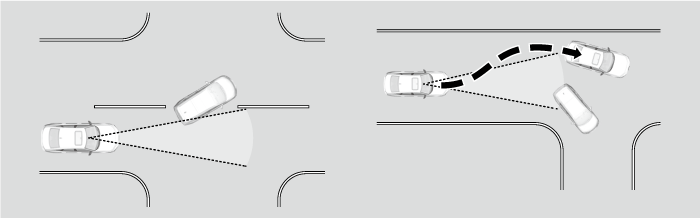
- When your vehicle approaches vehicles, pedestrians, or moving bicycles.
- When vehicles, pedestrians, or moving bicycles are passing in front of you.
- When you drive under a low structure or through a narrow gate at high speed.
- When there are traffic signs or structures such as guard rails beside the road along a curve.
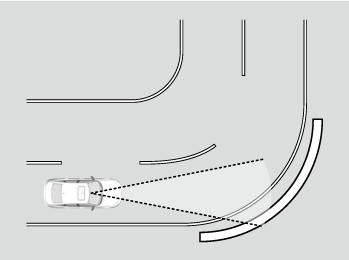
- When driving through curves, your vehicle comes to a point where the oncoming vehicle is right in front of you.
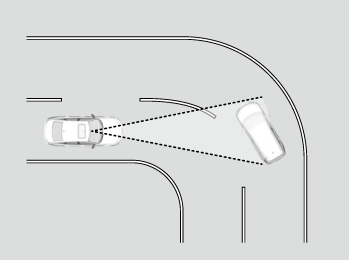
- When approaching stationary vehicles or walls, such as when parking.
- A vehicle approaches from the side as it is driving through a curve.
- You pass by a vehicle (including motorcycles), pedestrian, or bicycle that is turning left or right.
- You pass in front of a vehicle (including motorcycles), pedestrian, or bicycle that is approaching from the side.
- A vehicle (including motorcycles), pedestrian, or bicycle turns left or right while approaching your vehicle from the side.
- You attempt to pass in front of a vehicle (including motorcycles) or bicycle while you are turning left or right.
- A vehicle (including motorcycles) or bicycle is attempting to pass in front of your vehicle while you are turning left or right.
- A vehicle (including motorcycles), pedestrian, or bicycle enters the path of your vehicle and stops in front of you.
- When you are turning left or right, a crossing pedestrian enters the path of your vehicle and stops in front of you.
- You pass close by the side of a vehicle parked on the street.
* Not available on all models
- Recommended topic(s)