


Parking Sensor System*
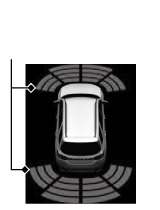
The corner and center sensors monitor obstacles around your vehicle, and the beeper, gauge and audio/information screen let you know the approximate distance between your vehicle and the obstacle.
- Detail
-
Even when the system is on, always confirm if there is no obstacle near your vehicle before parking.The system may not work properly when:
- The sensors are covered with snow, ice, mud, or dirt.
- The vehicle has been out in hot or cold weather.
- There is something nearby that emits ultrasonic waves or high frequency sounds.
- Driving in bad weather (rain, fog, snow, etc.).
The system may not detect these obstacles:- Thin or low objects.
- Sonic-absorptive materials, such as snow, cotton, or sponge.
- Obstacles immediately in front of the bumper.
The system may falsely detect obstacles in the following situations:- The vehicle is on uneven surface, such as grass, bumps, or a hill.
- When close to other vehicles with sonar sensors or other objects that emit ultrasonic waves.
- There is splashing water near the sensors due to heavy rains, etc.
Do not put any accessories on or around the sensors.- If you put any accessories (such as a towing hitch or bicycle rack) on or around the rear sensors, the system may activate if it detects these accessories as an obstacle. In this case, turn off the rear sensor.
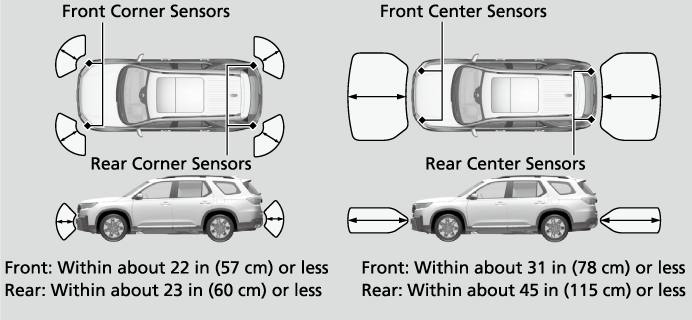
The Sensor Location and Range
Parking Sensor System On and Off
You can turn the system on and off using the driver information interface.
The front corner, rear corner and rear center sensors start to detect an obstacle when the transmission is in R, and the vehicle speed is less than 5 mph (8 km/h).
The front corner and front center sensors start to detect an obstacle when the transmission is in any position other than P or R, and the vehicle speed is less than 5 mph (8 km/h).
- Detail
-
When you set the power mode to ON, the system will be in the previously selected condition.You can turn the rear parking sensor system on and off using the audio/information screen.
If the rear sensors are turned off when using the parking sensor system, the Low Speed Braking Control System will not activate while reversing.
When the Drive Mode is in TOW mode, the rear parking sensor system will turn off.
When the vehicle is moving forward at 5 mph (8 km/h) or less, the system detects any obstacles in front of the vehicle and the forward camera image will display as the distance between them decreases.Multi View Camera System*Displaying an Image From the Multi View Cameras
You can customize whether or not to display the forward camera image when an obstacle is detected.
When the Distance Between Your Vehicle and Obstacles Becomes Shorter
|
Interval between beeps
|
Distance between the Bumper and Obstacle
|
Indicator
|
Gauge
|
Audio/Information Screen
|
|
|---|---|---|---|---|---|
|
Corner Sensors
|
Center Sensors
|
||||
|
Moderate
|
—
|
Front: About 31-23 in (78-58 cm)
Rear: About 45-24 in (115-61 cm)
|
Comes on*1/Blinks*2 in Yellow*3
|
 |
 |
|
Short
|
Front: About 22-18 in (57-45 cm)
Rear: About 23-18 in (60-45 cm)
|
Front: About 23-19 in (58-48 cm)
Rear: About 24-18 in (61-46 cm)
|
Comes on*1/Blinks*2 in Amber
|
||
|
Very short
|
About 18-14 in
(45-35 cm) |
Front: About 19-15 in (48-38 cm)
Rear: About 18-14 in (46-36 cm)
|
|||
|
Continuous
|
About 14 in
(35 cm) or less |
Front: About 15 in
(38 cm) or less Rear: About 14 in
(36 cm) or less |
Comes on*1/Blinks*2 in Red
|
||
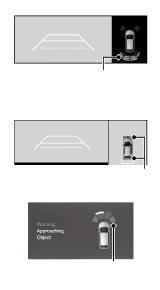
- On the gauge
- On the audio/information screen
- At this stage, only the center sensors detect obstacles.
To temporarily turn off the beeper, press the right selector wheel while it is sounding. Temporary OFF will be canceled when the shift position changes from P/R to N/D/S or vice-versa, or the vehicle speed reaches 9 mph (14 km/h) or higher.
* Not available on all models
- Recommended topic(s)