


Customized Features
- Detail
-
When you customize settings:
- Make sure that the vehicle is at a complete stop.
- Put the transmission into P.
Use the audio/information screen to customize certain features.
How to Customize the General Settings
With the power mode in ON, select General Settings, then select a setting item.
System
|
Customizable Features
|
Description
|
Selectable Settings
|
||
|---|---|---|---|---|
|
Date & Time
|
Set Date & Time
|
Automatic Date & Time
|
Select On to have the GPS automatically adjust the clock. Select Off to cancel this function.
|
On/Off
|
|
Set Date
|
Adjusts date.
|
—
|
||
|
Set Time
|
Adjusts clock.
|
—
|
||
|
Time Zone
|
Automatic Time Zone
|
Sets the navigation system to automatically adjust the clock when driving through different time zones.
|
On/Off
|
|
|
(Select time zone)
|
Changes the time zone manually.
|
—
|
||
|
Auto Daylight Saving Time
|
Select On to have the GPS automatically adjust the clock to daylight savings time. Select Off to cancel this function.
|
On/Off
|
||
|
Date Format
|
Sets the date format.
|
Day-of-week, MM DD, YYYY/YYYY.MM.DD Day-of-week/YYYY.MM.DD (Day-of-week)/Day-of-week DD.MM.YYYY/DD.MM.YYYY
|
||
|
Time Format
|
Changes the digital clock display from 12H to 24H.
|
12H/24H
|
||
|
Customizable Features
|
Description
|
Selectable Settings
|
||
|---|---|---|---|---|
|
Language
|
Changes the display language.
|
English (United States)/Español/Français
|
||
|
Touch Panel Sensitivity
|
Sets the sensitivity of the touch panel screen.
|
Low/High
|
||
|
About
|
IP Address
|
Displays the Android setting items.
|
—
|
|
|
Wi-Fi MAC Address
|
||||
|
Bluetooth MAC Address
|
||||
|
Serial Number
|
||||
|
Up Time
|
||||
|
Model Number
|
||||
|
Android Version
|
||||
|
Kernel Version
|
||||
|
Build Number
|
||||
|
Software Version
|
||||
|
Factory Data Reset
|
Resets all the settings to their factory default.
|
Cancel/Continue
|
||
Connections
|
Customizable Features
|
Description
|
Selectable Settings
|
||
|---|---|---|---|---|
|
Manage Device Connections
|
Options
|
Bluetooth
|
Turns Bluetooth® on and off.
|
On/Off
|
|
Priority Device Information
|
Sets Bluetooth® connection priority.
|
—
|
||
|
Change Name
|
Changes vehicle name for Bluetooth® connection setting.
|
—
|
||
|
Smartphone Projection Screen Size
|
Changes the screen size of the smartphone projection.
|
Normal/Wide
|
||
|
Smartphone Projection Error Code
|
Displays the error code(s) of the smartphone projection.
|
—
|
||
|
+ Connect New Device
|
Pairs a new device to HFL.
|
—
|
||
|
(Saved Devices)
|
Connects, disconnects, or deletes a paired device.
|
—
|
||
|
Customizable Features
|
Description
|
Selectable Settings
|
||
|---|---|---|---|---|
|
Wi-Fi
|
Options
|
Wi-Fi
|
Allow vehicle to connect to Wi-Fi.
|
Off/On
|
|
Add Network
|
Allows you to connect to a new external network.
|
—
|
||
|
Saved Networks
|
Deletes a saved network or changes update permission settings for the selected network.
|
—
|
||
|
(Detected Networks)
|
Displays the detected network(s).
|
|||
|
Access Point
|
Options
|
Access Point
|
Allow wireless connection from the phone to the vehicle. This feature must be turned on for wireless Apple CarPlay or Android Auto to work.
|
Off/On
|
|
Edit Access Point Settings
|
Allows you to confirm hotspot settings and edit hotspot connection information.
|
—
|
||
|
Data Connection Options
|
Set Up Wi-Fi
|
Sets personal hotspot (phone tethering).
|
||
|
Set Up Vehicle Data Plan
|
Sets AT&T vehicle data plan.
|
|||
Privacy
|
Customizable Features
|
Description
|
Selectable Settings
|
||
|---|---|---|---|---|
|
Data Sharing with Honda
|
Toggles data sharing.
|
Disable/Enable
|
||
|
Microphone
|
Turns the microphone on and off. eCall can still be used regardless of settings.
|
|||
|
Location
|
Sets the data sharing permission for each function.
|
|||
|
App permissions
|
||||
|
System-wide Permission Settings
|
||||
|
Infotainment system data
|
||||
|
Data sharing with Google*1
|
||||
|
Ads
|
||||
|
Google legal*1
|
Google Terms of Service*1
|
Displays the Google URL.
|
—
|
|
|
Google Privacy Policy*1
|
||||
- Please confirm the details on the audio/information screen. Specifications are subject to change via system updates, etc.
Display
|
Customizable Features
|
Description
|
Selectable Settings
|
||
|---|---|---|---|---|
|
Brightness
|
Changes the brightness of the audio/information screen.
|
—
|
||
|
Contrast
|
Changes the contrast of the audio/information screen.
|
—
|
||
|
Black Level
|
Changes the black level of the audio/information screen.
|
—
|
||
|
Day Mode*1
|
Changes between the daytime mode and night mode.
|
—
|
||
|
Night Mode*1
|
||||
|
Display Off
|
Turns the audio/information screen brightness off.
|
—
|
||
- When the AID sensor is disabled.
Sound
|
Customizable Features
|
Description
|
Selectable Settings
|
||
|---|---|---|---|---|
|
Bass / Mid / Treble
|
Treble
|
Adjusts the settings of the audio speakers’ sound.
|
- 6 ~ 0 ~ + 6
|
|
|
Midrange
|
- 6 ~ 0 ~ + 6
|
|||
|
Bass
|
- 6 ~ 0 ~ + 6
|
|||
|
Balance / Fader*
|
Front/L/R/Rear
|
|||
|
Audio Zones & Balance / Fader*
|
Full Vehicle/Driver Only/Front Only/Rear Only
|
|||
|
Speed Volume Compensation*
|
Off/Low/Mid/High
|
|||
|
Bose Centerpoint*
|
Off/On
|
|||
|
Bose Dynamic Speed Compensation*
|
Off/Low/Mid/High
|
|||
Sound Volume
|
Customizable Features
|
Description
|
Selectable Settings
|
||
|---|---|---|---|---|
|
System Sounds
|
Adjusts sound volume settings.
|
0~2~3
|
||
|
Voice Recognition
|
1~2~11
|
|||
|
Navigation Guidance
|
0~6~11
|
|||
|
Phone Calls
|
0~20~40
|
|||
Camera
|
Customizable Features
|
Description
|
Selectable Settings
|
||
|---|---|---|---|---|
|
Rear Wide Camera*
|
Guidelines
|
Fixed Guideline
|
Shows the guideline that does not move with the steering wheel.
|
On/Off
|
|
Dynamic Guideline
|
Shows the guideline that moves with the steering wheel.
|
On/Off
|
||
|
Multi View Camera*
|
Guidelines
|
Fixed Guideline
|
Shows the guideline that does not move with the steering wheel.
Multi View Camera System*Displaying an Image From the Multi View Cameras |
On/Off
|
|
Dynamic Guideline
|
Shows the guideline that moves with the steering wheel.
Multi View Camera System*Displaying an Image From the Multi View Cameras |
On/Off
|
||
|
Customize
|
Show after Shifting from Reverse
|
Selects whether to display the forward camera image after shifting from R to D.
|
On/Off
|
|
|
Auto Display When Obstacle is Detected
|
Displays the forward camera image when a parking sensor detects an obstacle.
|
On/Off
|
||
|
Cross Traffic Monitor
|
Shows arrows on the rear camera image to indicate vehicles approaching from the sides.
|
On/Off
|
||
Voice Control
|
Customizable Features
|
Description
|
Selectable Settings
|
||
|---|---|---|---|---|
|
Default Assist App
|
Selects the assistant app.
|
None/Alexa/Google Assistant
|
||
|
Listen for “Hey Siri”*1
|
Toggles whether Siri starts up when you say “Hey Siri”.
|
On/Off
|
||
|
Google Assistant
|
Sets the functions of Google Assistant.
|
—
|
||
- Activates when the iPhone is connected.
Security
You can customize security settings. Please confirm the details on the audio/information screen.
Specifications are subject to change via system updates, etc.
You can customize Google settings. Please confirm the details on the audio/information screen.
Specifications are subject to change via system updates, etc.
Advanced Settings
You can customize advanced system settings. Please confirm the details on the audio/information screen.
Specifications may be changed via system updates, etc.
How to Customize the Vehicle Settings
With the power mode in ON, select the Home, and then select Vehicle Settings and select a setting item.
- Detail
-
You can change the color of the vehicle image by selecting the Menu.
Driver Assist System Setup
|
Customizable Features
|
Description
|
Selectable Settings
|
|---|---|---|
|
Forward Collision Warning Distance
|
Changes the distance at which Collision Mitigation Braking SystemTM (CMBSTM) alerts.
|
Long/Normal*1/Short
|
|
Head-up Warning*
|
Turns warning light On/Off for head-up flash alert.
|
On*1/Off
|
|
ACC Forward Vehicle Detect Beep
|
Turns audible notification On/Off when vehicle has moved in/out of Adaptive Cruise Control with Low Speed Follow range.
|
On/Off*1
|
|
Road Departure Mitigation Setting
|
Selects operating mode of the Road Departure Mitigation system.
|
Narrow/Normal*1/Wide/Warning Only
|
|
Lane Keeping Assist Suspend Beep
|
Switches the LKAS and Traffic Jam Assist suspend alert beeps on and off.
|
On/Off*1
|
|
Blind Spot Information
|
Turns the blind spot information system audible alert On/Off.
|
Audible And Visual Alert*1/Visual Alert
|
- Default Setting
|
Customizable Features
|
Description
|
Selectable Settings
|
|---|---|---|
|
Traffic Sign Recognition System Display Setting
|
Displays the traffic sign recognition system on instrument panel.
|
On*1/Off
|
|
Traffic Sign Recognition System Speed Limit Warning
|
Enables over speed limit warning when speed limit is exceeded.
|
On/Off*1
|
|
Speed Limit Warning Threshold Setting
|
When Traffic Sign Recognition System Speed Limit Warning setting is on, select speed limit warning threshold based on personal preference.
|
Speed Limit*1/
Speed Limit+3mph/ Speed Limit+5mph/ Speed Limit+10mph (When mph is selected)
Speed Limit*1/
Speed Limit+5km/h/ Speed Limit+10km/h/Speed Limit+15km/h (When km/h is selected)
|
|
Driver Attention Monitor
|
Changes the setting for the driver attention monitor.
|
Tactile And Audible Alert*1/Tactile Alert/Off
|
|
Rear Sensor Setting*
|
Turns On/Off the rear parking sensor. This selection will also affect the rear Low Speed Braking Control if equipped.
|
On*1/Off
|
- Default Setting
Meter/Head-up Display*Setup
|
Customizable Features
|
Description
|
Selectable Settings
|
|---|---|---|
|
Adjust Outside Temp. Display
|
Adjusts outside temperature reading by a few degrees.
|
-5°F ~ ±0°F*1 ~ +5°F (U.S.)
-3°C ~ ±0°C*1 ~ +3°C (Canada)
|
|
“Trip A” Reset Timing
|
Changes the timing to reset Trip A.
|
When Fully Refueled/IGN Off/Manually Reset*1
|
|
“Trip B” Reset Timing
|
Changes the timing to reset Trip B.
|
When Fully Refueled/IGN Off/Manually Reset*1
|
|
Adjust Alarm Volume
|
Changes volume level of all system warnings, door opening warning, and indicators.
|
High/Mid*1/Low
|
|
Reverse Alert Tone
|
Turns the reverse alert tone on and off.
|
On*1/Off
|
|
Fuel Efficiency Backlight
|
Turns the ambient meter feature on and off.
|
On*1/Off
|
|
Turn by Turn Auto Display
|
Toggles the pop-up information in the turn-by-turn navigation in the driver information interface/head-up display*.
Navigation(Driver Information Interface (Right Side Area)) Navigation(Head-Up Display*) |
On*1/Off
|
|
Rear Seat Reminder
|
Turns the Rear Seat Reminder feature on and off.
|
On*1/Off
|
|
Speed/Distance Units
|
Selects the speed/distance units.
|
km/h · km/mph · miles*1
(U.S.) km/h · km*1/mph · miles (Canada)
|
- Default Setting
Driving Position Setup*
|
Customizable Features
|
Description
|
Selectable Settings
|
|---|---|---|
|
Memory Position Link
|
Turns the driving position memory system on and off.
|
On*1/Off
|
|
Seat Position Movement At Entry/Exit
|
Moves the seat rearward when you enter/exit of the vehicle. Changes the setting for this feature.
|
On*1/Off
|
- Default Setting
Keyless Access Setup
|
Customizable Features
|
Description
|
Selectable Settings
|
|---|---|---|
|
Door Unlock Mode
|
Changes which doors unlock when you grab the driver’s door handle.
|
Driver Door Only*1/All Doors
|
|
Keyless Access Light Flash
|
Causes some exterior lights to flash when you unlock/lock the doors.
|
On*1/Off
|
|
Keyless Access Beep
|
Causes the beeper to sound when you unlock/lock the doors.
|
On*1/Off
|
|
Remote Start System On/Off
|
Turns the remote engine start feature on and off.
|
On*1/Off
|
|
Lockout Prevention
|
Changes the settings for the lockout protection function.
|
On*1/Off
|
- Default Setting
Lighting Setup
|
Customizable Features
|
Description
|
Selectable Settings
|
|---|---|---|
|
Auto High-Beam
|
Toggles the auto high-beam.
|
On*1/Off
|
|
Interior Light Dimming Time
|
Selects the length of time the interior lights stay on after doors are closed.
|
60sec/30sec*1/15sec
|
|
Headlight Auto Off Timer
|
Selects the length of time the exterior lights stay on after you close the driver's door.
|
60sec/30sec/15sec*1/0sec
|
|
Auto Light Sensitivity*
|
Changes the timing for the headlights to come on.
|
Max/High/Mid*1/Low/Min
|
|
Auto Headlight On with Wiper On
|
Toggles headlight function at wiper operation when the headlight is in AUTO setting.
|
On*1/Off
|
- Default Setting
Door Setup
|
Customizable Features
|
Description
|
Selectable Settings
|
|---|---|---|
|
Auto Door Lock
|
Changes the setting for the automatic locking feature.
|
With Vehicle Speed*1/Shift From P/Off
|
|
Auto Door Unlock
|
Changes the setting for when the doors unlock automatically.
|
All Doors When Driver’s Door Opens*1/All Doors With Shift To P/All Doors with IGN Off/Off
|
|
Walk Away Auto Lock
|
Changes the settings for the auto lock function when you walk away from the vehicle.
|
On/Off*1
|
|
Keyless Lock Answer Back
|
Turns flash of exterior lights on/off when doors are locked/unlocked by keyless remote.
|
On*1/Off
|
|
Auto Folding Door Mirror*
|
Changes the door mirror auto-folding operation.
|
On*1/Off
|
|
Keyless Remote Power Window Control
|
Turns the remote window control on and off.
|
On*1/Off
|
|
Lock Presetting
|
Toggles the lock presetting function.
|
On*1/Off
|
- Default Setting
Power Tailgate Setup
|
Customizable Features
|
Description
|
Selectable Settings
|
|---|---|---|
|
Keyless Open Mode
|
Changes the setting to enable the power tailgate to be opened with the keyless remote at any time or only when the doors are unlocked.
|
Anytime*1/When Unlocked
|
|
Power Open By Outer Handle
|
Changes the setting to enable or disable the power tailgate open operation when the user presses the outer handle of the power tailgate.
|
On (Power/Manual)*1/Off (Manual Only)
|
|
Hands Free Access Function*
|
Changes the setting to enable or disable the power tailgate open operation when a kicking motion under the rear bumper is detected.
|
On*1/Off
|
- Default Setting
Climate Control Setup
|
Customizable Features
|
Description
|
Selectable Settings
|
|---|---|---|
|
Driver Seat automatic Climate Control
|
Automatic climate control of Driver Seat with automatic air conditioner. Changes the interlocking control setting.
|
On*1/Off
|
|
Passenger Seat automatic Climate Control
|
Automatic climate control of Passenger Seat with automatic air conditioner. Changes the interlocking control setting.
|
On*1/Off
|
- Default Setting
Maintenance Info.
|
Customizable Features
|
Description
|
Selectable Settings
|
|---|---|---|
|
Maintenance Info.
|
Resets the maintenance information.
|
Select Reset Items
|
Vehicle Color Settings
You can change the body color of the vehicle image on the Vehicle Settings screen.
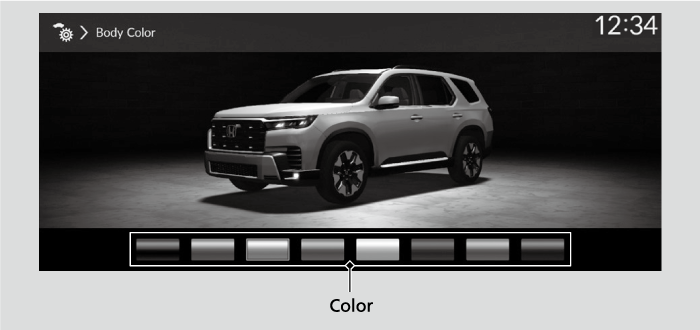
- Select Menu.
- Select Body Color.
- Select desired color.
* Not available on all models
- Recommended topic(s)